Thursday, 29 April 2010
Review Of The Presentation Day
Wednesday, 28 April 2010
PICAXE Code - Line Following
symbol switchstate = b0
main:
if switchstate = 0 then
debug switchstate ;used so we can see the state the swith b0 is in
goto program1
else
goto program2
endif
goto main
program1: ;used to follow the track
readadc 1, b1 ;reads and converts the analogue input from left LDR
debug b1 ;used to calibrate the left LDR
readadc 2, b2 ;reads and converts the analogue input from right LDR
debug b2 ;used to calibrate the right LDR
high 5 ;sends an output high to the two LED's
high 6
if b2 > 110 and b1 ;if the left LDR is on white and the right LDR on black
goto right
endif
if b2 <> 110 then ;if the left LDR is on black and the right LDR on white
goto left
else ;otherwise move forwards
goto straight
endif
goto main
program2: ;used to identify the symbols
readadc 1, b1 ;reads and converts the analogue input from left LDR
debug b1 ;used to calibrate the left LDR
readadc 2, b2 ;reads and converts the analogue input from right LDR
debug b2 ;used to calibrate the right LDR
high 5 ;sends an output high to the two LED's
high 6
if b2 > 110 and b1 > 110 then ;if the left LDR is on black and the right LDR on black
low 1 low 2 low 3 low 4 ;stay stationary for three seconds
pause 3000
endif
goto program2
if b2 > 110 and b1 ;if the left LDR is on white and the right LDR on black
goto left ;turn left for three seconds
endif
if b2 <> 110 then ;if the left LDR is on black and the right LDR on white
goto right ;turn right for three seconds
else ;otherwise move backwards
goto back
endif
goto main
straight:
low 1 high 2
low 3 high 4
goto main
right:
low 1 low 2 low 3 high 4
goto main
left:
low 1 high 2 low 3 low 4
goto main
back:
low 2 high 1 low 4 high 3
goto main
Tuesday, 27 April 2010
The Completed Buggy
Buggy Build Update
We experienced problems with the LDR's not reading light the way we would have liked it to. Because the LDR's read all visible light, the sensitivity repeatedly changed in different ambient lighting conditions. At one time during testing the LDR's readings changed by 40 from around 100 to 60 when taking the buggy into different rooms. To solve this problem we incorperated the use of a shield which blocked ambient light from reching the LDR's. This shield was made from black card and was assembled around the two sensors. The black card reduces the reflection of the light from the LED's. This means that only light from the LED's is reflected from the white surface to the LDR's, therefore improving the line following performance of the buggy.
Monday, 26 April 2010
Line following code ( First programme code)

Following the first test with the LED using the simple program shown in the video of the 1-04-2010, we came up with this first code to programme the buggy to follow the line.
The Above picture shows the first programme code
Analysis of the Programme (CODE).
Including debug in the programme, we wanted to view how the values included in the programme affected the manner in which the buggy will respond. This way it made it easy to adjust and hence modify the programme. Also, we decided to use a combination of "if...then" statements and sub-routines because we found this method of programming much easier to write and simple to undestand.
However, after writing this programme and programming the buggy, we found out a couple of errors with the code. Firstly, we discovered the range of values associated to the LDR (245, above and below) was quite large and the fluctations of the values hardly went up to 245. So making the values much smaller sounded very reasonable. Secondly, because the LDR was affected by the intensity of light at any one time of the day in a room, it was difficult to get a specific and accurate value to assign to the LDR since light conditions were not stable. Lastly, we noticed that whenever the buggy was moving it kept going in a circular path. After careful analysis we realised that the left and right sub-routines were interchanged.
Check out for the new and approved code with new values and improved sub-routines.
LED change
With the presentation looming our utter most concern is for the buggy to complete the course and this has led to some inspired last minute changes. So far throughout testing 2 red LEDs were being used with the intention of carrying these on to the presentation but unfortunately or rather fortunatelywe have discovered that we are these are causing calibration problems.This is due to the red LED not providing enough constant elumination to the LDRs so as to maintain the same binary analogue values. This has led us to test and switch to using to white LEDs even though they are more costly. This is simplly because the illumination they give is far much superior that what we have been testing so far and therfore this should boost our line following chances and at the same time reduce the need for constant re-calibration.
Thursday, 22 April 2010
Circuitry Testing

Tuesday, 20 April 2010
Cicuitry
Wednesday, 14 April 2010
Line following Problems
Monday, 12 April 2010
Buggy Build Update
The breadboard is the largest component, so we have decided to mount it along the top of the chassis in between the two wheels.
The PICAXE project board is mounted above the breadboard to avoid a short circuit. This also improves the aesthetics of the design as it now ressembles a RC Buggy.
The motors are mounted onto the bottom of the chassis in order to keep maximum space available across the top for the breadboard.
The battery back is mounted off the back of the PICAXE project board. The reason for this is so that the wheels have increased traction because of the load being directly over the wheels.
The LED's and LDR's are connected to the front end of the breadboard, in order to keep the circuitary neat. This also means the length of the wires used to connect each component can be shorter.
The sensing system being a fair distance from the motors improves the performence of the buggy. This is because the motors need to turn less when correcting itself whilst following the line. The motor turning less, decreases the angle of correction and would therefore increase the line following speed and accuracy of the buggy.
Saturday, 10 April 2010
Floating Role
On reading my posts you may wonder exactly what role I had in this group, but because i am the 6th member of the group I just took on a floating role and commented and helped in all areas. Just to avoid any confusion I posted this.
Buggy Build Update


Tuesday, 6 April 2010
Manufacture Of The Chassis
As a group we thought of many different ideas for the chassis, including the use of lego, acrylic sheet and cardboard. The list was narrowed down as we thought most of these ideas were not feasible for a number of reasons, such as rigidity and being difficult to build.
Three ideas were selected to be feasible, one of them being a used RC buggy chassis and the other two employing the use of meccano and plywood.

The used RC buggy was specifically designed for a purpose by its manufacturer. Hence the holes and mounts on the chassis. If this was selected the holes and mounts would get in the way of our circuitry. The holes also look visually unappealing.
Choosing to manufacturer the buggy chassis using plywood gives us more freedom to change the chassis to fit the circuitry. However, once the chassis has been manufactured to fit it is difficult to adapt it, therefore a new chassis would need to be built.
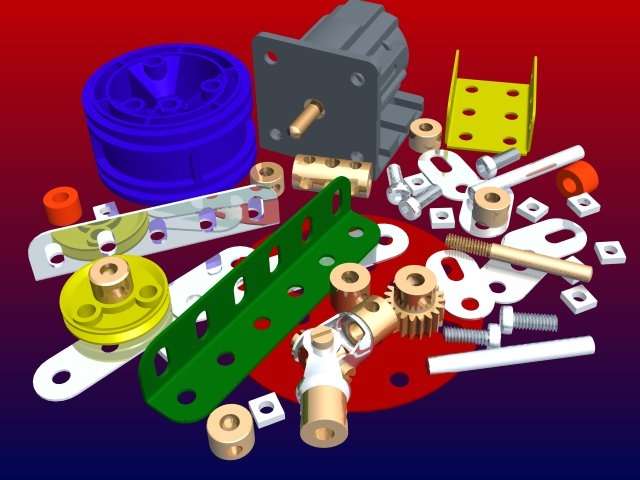
Using meccano to build the chassis is the most feasible and practical idea because it holds no limitations. If the design of the chssis needs to be changed at any point it can easily be done. Also, meccano would be the most visually appealing chassis out of the three pictured above.
Thursday, 1 April 2010
Choosing Input Sensing Method
Wednesday, 24 March 2010
Using LDR's to track the black line
It is possible to use one LDR to act as the sensing device to track the line; however the buggy would not follow the line smoothly. To improve the smoothness (resolution) of the line following, more LDR’s would need to be used.
As we are limited to the number of LDR’s we can connect to our project board the group have made a decision to use 2 LDR’s in a line combination.
The diagram above shows how the buggy could follow the black line. It uses the two LDR's (S1 and S2) to navigate its way along the line in a zig zag motion. The LDR's (S1 and S2) read the intensity of the light being reflected from the track surface. So, when S1 is directly above the black line the light intensity is low making the buggy turn left. Smilarly, when S2 is directly above the black line the light intensity is low making the buggy turn right. We could include another case where neither S1 or S2 are above the black line. When this is the case both wheels would be turning at the same rate, therefore keeping the buggy moving in a forward direction.
Tuesday, 23 March 2010
-------------------------------------------------------
symbol Motor = 2
symbol LDR = 1
Main:
gosub Light
gosub Spin
goto main
Light:
if pin1 = 1 then
low 1
else pin1 = 0
high 1
endif
return
Spin:
high Motor
pause 200
low Motor
return
Sensors
To avoid that problem, two pairs of ordinary photoresistors can be used. Also called photocells, they're able to see visible light in the same ranges as the human eye. So, if you can see the line, hopefully the robot can too.
Photoresistors react quite slowly however , which could hamper a robot that's driving around on a fast track.
Line robots
The line follower is one of the self operating robot that follows a line that drawn on the floor. The basic operations of the line following are as follows:
- Capture line position with optical sensors mounted at front end of the robot. Most use several number of photo-reflectors, and some leading use an image sensor for image processing. The line sensing procss requires high resolution and high robustness.
- Stear robot to track the line with any stearing mechanism. This is just a servo operation.
- Control speed according to the lane condition. Running speed is limited during passing a curve due to friction of the tire and the floor.
There are two line styles, white line on the black floor and black line on the white floor. Most adopting the first one in line width of between 15 and 25 mm.
- Mechanics
Right image shows bottom view and side view of the built line following robot. All mechanical and electrical parts are mounted on a proto board, and it also constitutes the chasis.
The line following robot is upheld in three points of two driving wheels and a free wheel. The driving wheels are made with a 7 mm dia ball bearing and a rubber tire. The free wheel is a 5 mm dia ball bearing attached loosely. To drive driving wheels, two tiny motors that are used for mobile phones, pager or any mobile equipment are used. Its shaft is pressed onto the tire with a spring plate, the output torque is transferred to the wheels.
The stearing mechanism is realized in differential drive that stear the robot by difference in rotation speed between the left wheel and the right wheel. It does not require any additional actuator, only controling the wheel speed will do.
Tuesday, 16 March 2010
Project Brief
The first operation is for the buggy to follow a line made from a dark magnetic strip of 20mm width. The deviations of the line will be at no more than 45 degrees.
The second operation is for the buggy to read road markings (90 degree turn left, 90 degree turn right and a T-junction) and execute the appropriate motion.
ROLE ALLOCATIONS
ELECTRONIC ENGINEER: ONWELL MOYO
PRODUCT ENGINEER: SIDHU RAJINDER
PROGRAMMER 1: NGANG ARNOLD
PROGRAMMER 2: NYAMBE ILUTE